


AccDoo HRMS Logo
Modern HR & Payroll Automation

Modern HR & Payroll

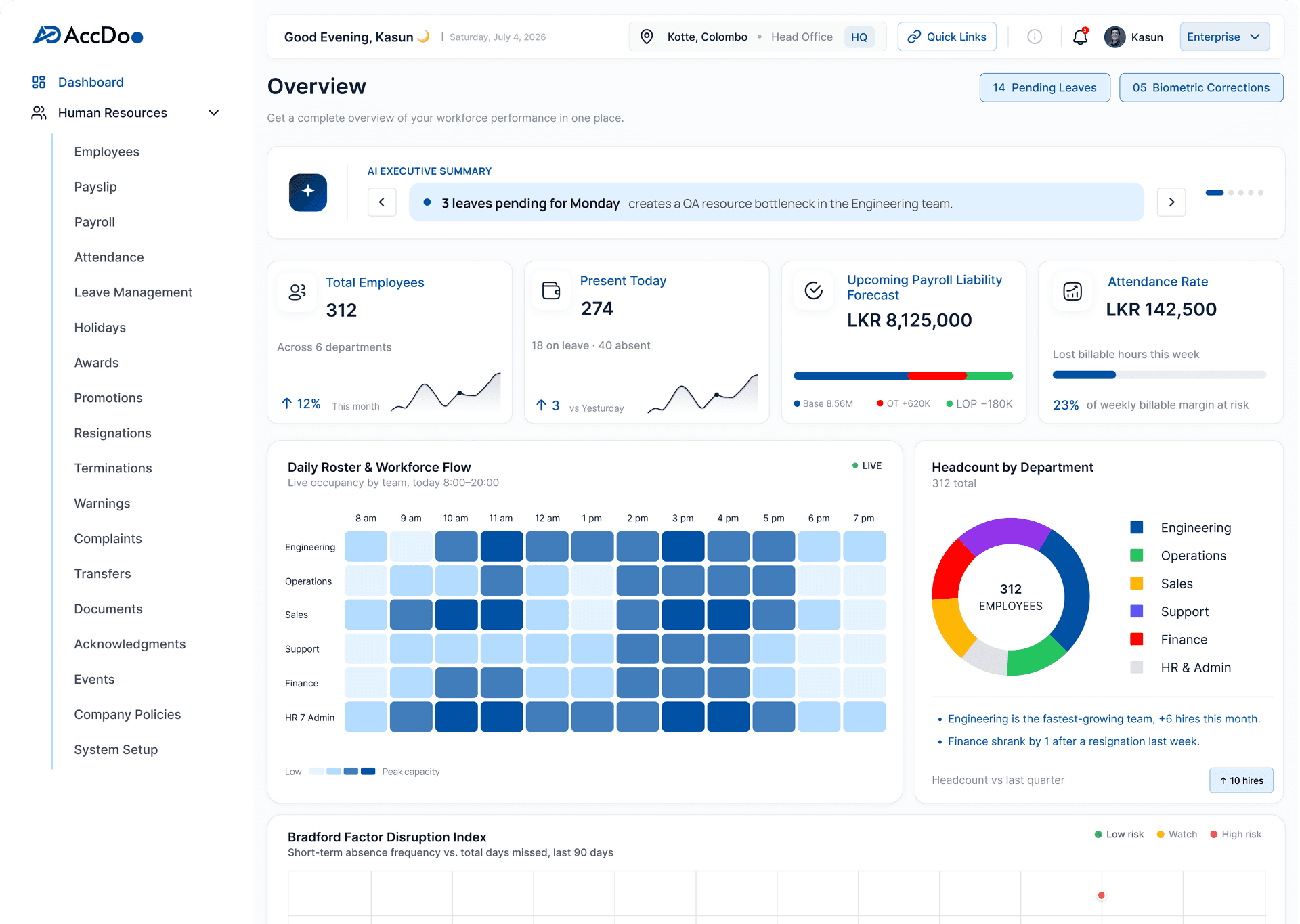
Empower your organization with AI-assisted employee lifecycle management, automated EPF/ETF payroll runs, and QR-based attendance tracking.

Explore HRMS Modules
AccDoo Logo
đź‘‹

Welcome to Accdoo

Manage your accounting
from anywhere.

Language

Region

© accdoo.ai 2026

Module 1

Onboarding Application

A new hire’s first week genuinely shapes how they feel about a job for a lot longer than that single week actually lasts – and spending it chasing missing paperwork, waiting around for system access, or filling out the same form for a third time isn’t the impression most Sri Lankan businesses are actually trying to make on someone they just spent time and effort recruiting.

First impressions in employment work much like they do anywhere else – disproportionately powerful relative to how much time they actually take, and genuinely difficult to fully undo once a new hire’s initial perception has already formed.

Why This Matters for Sri Lankan Businesses

Onboarding is also where a significant amount of compliance-relevant documentation typically gets collected – identification documents, bank details needed for EPF/ETF setup, signed policy acknowledgements – and a disorganized process at this specific stage creates gaps that inevitably surface later, usually at the least convenient possible time, such as during a first payroll run with genuinely missing bank details.

There’s also a measurable productivity cost to slow onboarding beyond just the new hire’s personal experience. Every day a new employee spends without proper system access or a clear understanding of their role and responsibilities is a day of reduced productivity that a more structured, faster process would have avoided entirely.

A Familiar Scenario

A growing fintech startup in Colombo currently onboards new hires through a mix of PDF forms emailed back and forth, a verbal policy briefing that varies noticeably depending on who happens to be delivering it that week, and IT account setup requested through a completely separate ticketing system that sometimes takes several days to actually be actioned. New hires have specifically mentioned, in exit interviews from previous roles elsewhere, just how disorganized a first week can genuinely feel.

Common Challenges Without the Right System

  • Onboarding documents collected via scattered email attachments, with no central, reliable tracking of what’s actually been received
  • Policy briefings delivered quite inconsistently, depending heavily on who happens to be conducting the onboarding that particular week
  • Account and system access requested through an entirely separate process, often causing real delays during a new hire’s critical first days
  • No clear visibility into overall onboarding status for HR teams managing multiple new hires simultaneously
  • Missing critical details – like bank information needed for EPF/ETF – not caught until the very first payroll run is already underway
  • New hires unclear on exactly what’s expected of them or who to approach with questions during their initial days

What to Look For

  • Digital document collection and verification, entirely replacing scattered, hard-to-track email attachments
  • New hires set up automatically with the correct role, department and system access from day one
  • Consistent policy sharing and formal acknowledgement, regardless of who happens to be managing the onboarding that week
  • Onboarding status visible to HR across every new hire currently being processed, all in one dashboard
  • Details required for payroll setup captured upfront during onboarding, well before the first pay cycle begins
  • A clear, structured checklist that gives new hires visibility into their own onboarding progress

How AccDoo Handles This

AccDoo HRMS handles onboarding as a single guided digital flow – documents collected and verified in one central place, policies shared consistently regardless of who’s specifically running the process that week, and role or department access configured as a natural part of the same setup rather than a completely separate IT ticket request.

Because onboarding and payroll live within the same connected system, the bank and personal details needed for a smooth first payroll run are captured upfront as a natural part of the onboarding flow itself, rather than being discovered as missing only after the first pay cycle is already actively underway.

Sri Lankan Market Context

Sri Lanka’s competitive job market, particularly in IT, BPO and financial services, means candidates frequently have multiple active offers to weigh against each other – and a disorganized, clearly unpolished onboarding experience can genuinely undermine confidence in an otherwise strong offer, right at the exact moment a new hire is still forming their overall impression of the company they’ve chosen to join.

For businesses hiring across multiple locations simultaneously, consistent onboarding also matters for maintaining company culture as the organization scales – a structured process ensures every new hire, regardless of which branch or department they’re joining, receives the same core information and genuinely feels equally welcomed and prepared from their very first day.

Who This Is Built For

Any Sri Lankan business hiring regularly enough that onboarding consistency has become a genuine, recognized concern – particularly growing companies where the process currently varies noticeably depending on who happens to be handling it week to week.

Getting Set Up

Configuring onboarding involves defining the standard document checklist, policy set, and role-based access templates the business uses for new hires. Once set up, each new hire follows the same guided flow, with HR able to track progress across everyone currently being onboarded.

Frequently Asked Questions

Can onboarding documents be collected and verified digitally? Yes – new hires submit required documents digitally, with HR able to track and verify exactly what’s been received, all in one central place.

Does onboarding connect directly to payroll setup? Yes – details needed for the first payroll run, including bank information for EPF/ETF, are captured as a natural part of the onboarding flow itself.

Can HR track onboarding status for multiple new hires at once? Yes – a dashboard view shows onboarding progress across every new hire currently being processed simultaneously.

Can onboarding checklists be customized for different roles or departments? Yes – document and access requirements can vary by role or department while still following the same overall consistent process.

Can a new hire start filling in some onboarding details before their official start date? Yes – onboarding can begin as soon as an offer is accepted, letting a new hire submit documents and details ahead of day one so their first morning isn’t spent on paperwork.

Getting Started

A disorganized first week costs more than it might initially look like – both in real HR hours spent and in how a new hire ultimately feels about the job they just accepted. Explore Onboarding Software or book a demo to see the guided flow directly.

Module 2

Expense Management Software

Employee expense claims have a habit of ending up in exactly the wrong place – a folder of loose paper receipts, a forwarded email chain, a spreadsheet somebody genuinely intends to keep updated but rarely does – none of which actually helps anyone when reimbursements are due at month-end.

The frustration here cuts both ways. Employees genuinely dislike being personally out of pocket for a legitimate work expense any longer than necessary, and finance teams dislike the tedious manual matching work required to verify and process claims that arrive in inconsistent, disorganized formats each month.

Why This Matters for Sri Lankan Businesses

For Sri Lankan businesses with field staff, active sales teams, or regular business travel, expense claims are frequent enough that a slow or genuinely error-prone process directly and measurably affects employee goodwill – nobody enjoys being personally out of pocket for a legitimate work expense for longer than it should reasonably take to get reimbursed.

There’s a compliance angle too, often overlooked. Expense claims that don’t get properly categorized and documented can complicate tax-deductibility down the line, turning what should be a straightforward reimbursement into a potential grey area if it’s ever reviewed as part of a broader tax audit.

A Familiar Scenario

A sales team at a consumer goods distributor in Colombo submits fuel and client-entertainment expenses through a shared spreadsheet, with supporting receipts emailed separately afterward as photos. The finance team spends a meaningful chunk of every month manually matching those emailed photos back to the correct spreadsheet rows, and as a direct result, reimbursements routinely lag by several weeks behind when the expense was actually incurred.

Common Challenges Without the Right System

  • Expense claims submitted through an inconsistent mix of spreadsheets, emails and loose physical receipts
  • Receipts disconnected entirely from the actual claim itself, requiring tedious manual matching later on
  • Approval routing handled informally, with no clear, retrievable record of who actually approved what and when
  • Reimbursement delays caused primarily by the matching and approval process itself, not by any underlying cash flow issue
  • Expenses reconciled against the company’s books as a separate exercise, rather than flowing directly into accounting
  • No easy way to see total expense trends by employee, department or category without significant manual analysis

What to Look For

  • Expense claims submitted with a photo of the receipt attached directly, right from the mobile app
  • Approvals routed automatically to the correct manager based on the employee’s reporting structure
  • Claim status visible to the employee throughout the entire process, from submission through to final reimbursement
  • Reimbursed expenses reconciling directly against the company’s books, not tracked in a separate log
  • Expense reporting available by individual employee, by department, or by category for trend analysis
  • Configurable spending policies that flag claims exceeding predefined limits for extra review

How AccDoo Handles This

AccDoo HRMS lets employees submit expense claims with a photo of the receipt attached at the exact moment of submission, routed automatically to the correct approver based on the reporting structure already in the system – no separate email thread, and no spreadsheet row sitting incomplete while it waits to be matched with a receipt that arrived through a different channel entirely.

Once approved, reimbursed expenses reconcile directly against the company’s books, since the same connected platform handles both HR and the underlying accounting connection – removing what would otherwise be a manual reconciliation step required between two entirely disconnected systems that don’t naturally talk to each other.

Sri Lankan Market Context

Field sales roles remain a significant and growing part of the Sri Lankan employment landscape, particularly in FMCG distribution, pharmaceuticals, and industrial sales – sectors where fuel, travel and client-entertainment expenses represent a genuine, recurring cost of doing business rather than an occasional exception. Streamlining this specific process delivers outsized value precisely because the volume of claims involved is consistently high.

Fuel price volatility in Sri Lanka in recent years has made accurate mileage and fuel expense tracking specifically more financially material than it might have been in a more stable pricing environment – a sales rep’s actual monthly fuel expense claim can vary meaningfully month to month, making manual estimation genuinely less reliable than a properly tracked, documented claim. Client entertainment and travel allowances are similarly common across Sri Lankan sales-driven businesses, and having a consistent, documented approval trail for these categories specifically also helps if spending patterns are ever questioned internally or during a tax review.

Who This Is Built For

Businesses with field sales teams, regular business travel, or any meaningful volume of employee-incurred expenses requiring reimbursement – particularly where the current process still involves emailing receipt photos separately from the actual claim itself, with no clear link between the two.

Getting Set Up

Setting up expense management involves defining standard expense categories and any relevant spending policies or limits, along with confirming the approval routing structure. Employees can then begin submitting claims directly from the mobile app straight away. Any outstanding, unreimbursed claims from the old process can be entered manually as a starting balance so nothing owed to an employee gets lost in the transition.

Frequently Asked Questions

Can employees submit expense claims from their phone? Yes – claims can be submitted with a receipt photo attached directly from the AccDoo mobile app, right at the point the expense is incurred.

How are expense approvals routed? Claims route automatically to the appropriate manager based on the employee’s existing reporting structure within the system.

Do reimbursed expenses reconcile with the company’s accounting records? Yes – reimbursed expenses reconcile directly against the books rather than requiring a separate, manual reconciliation exercise afterward.

Can spending limits be enforced automatically for certain expense categories? Yes – configurable spending policies can flag or restrict claims that exceed predefined limits for a given category, prompting additional review.

Can expense reports be broken down by department for budgeting purposes? Yes – expense reporting can be filtered and viewed by department, employee or category, supporting more accurate departmental budget tracking over time.

Getting Started

If expense reimbursement in your business currently means manually matching emailed receipt photos to a spreadsheet row, this closes that gap directly and immediately. Explore Expense Management or book a demo to see a claim go from submission to reimbursement in one connected flow.

Module 3

Performance Management

An annual review that nobody quite remembers the specific details of by the time it actually happens isn’t really measuring performance in any meaningful sense – it’s reconstructing a rough, general impression of the past twelve months from memory, which naturally tends to favor whatever happened most recently and most vividly.

That’s not a criticism of any individual manager’s diligence – it’s simply what happens when performance isn’t tracked as it occurs. Human memory genuinely isn’t built to accurately recall specific events from eleven months ago without some form of ongoing record to refer back to.

Why This Matters for Sri Lankan Businesses

Sri Lankan businesses increasingly compete for skilled talent on more than just salary alone – clear growth paths, fair and consistent recognition, and structured, meaningful feedback all matter significantly to retention, especially among younger employees who’ve often seen firsthand, at previous employers, just how disorganized performance management can feel from the receiving end.

There’s also a genuine fairness dimension across a growing organization. Without a structured, consistent record, performance evaluation ends up depending heavily on how naturally observant and diligent any particular manager happens to be – which means two equally capable employees can receive noticeably different quality of feedback purely based on who they happen to report to.

A Familiar Scenario

A mid-sized insurance brokerage in Colombo runs annual reviews using a shared document that individual managers fill in once a year, largely reconstructed from memory, with essentially no ongoing record of specific goals set or feedback actually given during the preceding twelve months. Employees have started quietly comparing notes with each other on just how inconsistent the whole process feels depending on which manager happens to be conducting their review.

Common Challenges Without the Right System

  • Performance reviewed once a year purely from memory, rather than tracked consistently and continuously throughout the year
  • Goals set informally, if they’re set at all, with no ongoing record to measure actual progress against later
  • Recognition and formal warnings handled quite inconsistently between different individual managers across the business
  • Promotions and transfers tracked entirely separately from the performance record that should logically inform those decisions
  • No structured way to share company policies and reliably confirm that employees have actually acknowledged them
  • Employees receiving noticeably different quality and frequency of feedback purely depending on which manager they report to

What to Look For

  • Goals, achievements and formal warnings recorded as they actually happen, not reconstructed at review time from memory
  • A consistent, standardized framework for recognition and performance tracking applied across every manager equally
  • Promotions and transfers logged as a natural part of the same underlying employee record
  • Company policies shared and their acknowledgement tracked directly through the platform for every employee
  • A genuinely complete performance history readily available at review time, not a blank page to fill from scratch
  • Standardized appraisal templates that help ensure consistency in how feedback is structured across the organization

How AccDoo Handles This

AccDoo HRMS records goals, achievements, formal warnings and recognition continuously, as they actually happen throughout the year – so an annual or quarterly review draws on a genuine, accurate record, not a manager’s compressed memory of the past several months squeezed into a single sit-down conversation.

Because promotions, transfers and ongoing performance notes all live within the same underlying employee record, the complete picture is readily available in one place at review time, and the overall process feels genuinely consistent across different managers rather than depending heavily on however naturally thorough any individual manager happens to be.

Sri Lankan Market Context

Performance management practices are visibly evolving across Sri Lankan corporate culture, with a noticeable generational shift toward more frequent, continuous feedback rather than the traditional once-a-year formal appraisal model that dominated for decades. Businesses that can genuinely support this shift with the right underlying tools – rather than trying to force continuous feedback into a system fundamentally designed around an annual cycle – tend to see meaningfully better employee engagement scores over time.

For family-owned Sri Lankan businesses specifically, formal performance management can sometimes feel like an uncomfortable, overly corporate addition to what has traditionally been a more personal, relationship-based way of managing staff. A well-designed system doesn’t need to replace that personal relationship – it simply gives it a consistent, fair structure to operate within, rather than leaving everything entirely to individual manager discretion.

Who This Is Built For

Any Sri Lankan business wanting performance reviews to genuinely reflect a real, ongoing record rather than a once-a-year memory-reconstruction exercise – particularly growing companies where maintaining consistency across multiple managers has become noticeably harder to sustain purely informally.

Getting Set Up

Getting started with performance management involves defining the review cycle and standard appraisal template the business wants to use, then encouraging managers to log goals, feedback and recognition on an ongoing basis rather than saving everything for the formal review itself. A short manager briefing on the new process tends to pay off, since the biggest adoption barrier is usually habit – remembering to log a note in the moment rather than waiting for the old once-a-year routine.

Frequently Asked Questions

Can managers record feedback throughout the year, not just at review time? Yes – goals, achievements and feedback can be logged continuously throughout the year, building a genuine record well ahead of any formal review.

Does performance tracking connect to promotions and transfers? Yes – promotions, transfers and ongoing performance notes are all part of the same unified employee record, not tracked separately.

Can company policies be shared and tracked for acknowledgement? Yes – policies can be distributed directly through the platform, with acknowledgement tracked individually per employee.

Does AccDoo support different appraisal templates for different roles? Yes – appraisal templates can be customized for different roles or departments while still maintaining overall consistency in the underlying process.

Can employees see their own performance history and past feedback? Yes – employees can view their own recorded goals, feedback and recognition history, rather than performance information being visible only to their manager.

Getting Started

If performance reviews in your business currently rely entirely on a manager’s memory once a year, building a continuous record genuinely changes both the fairness and the practical usefulness of the whole process. Explore Performance Management or book a demo.

Module 4

Employee Self-Service Portal

A genuinely surprising share of a small HR team’s week goes to answering questions employees could easily answer themselves – if only the relevant information were actually somewhere they could reach it directly, without emailing HR and then waiting around for a reply.

None of these individual questions are unreasonable on the employee’s part – wanting to know your own leave balance is entirely fair. The problem is structural: when the only way to get that answer is asking a person, it turns a simple information lookup into a small interruption for someone else’s workday.

Why This Matters for Sri Lankan Businesses

As a Sri Lankan business grows past the size where the HR person personally knows every single employee’s situation by heart, routine information requests scale up directly alongside headcount – and without genuine self-service, HR ends up spending a disproportionate share of its time on repetitive, low-value questions rather than the parts of the job that actually require human judgment.

There’s also a subtle trust dimension here. When employees can see their own accurate information directly – payslip history, leave balance, personal details on file – it removes a layer of dependency and, often, quiet suspicion about whether HR’s records actually match what the employee believes to be true.

A Familiar Scenario

An HR officer at a mid-sized BPO in Colombo estimates that roughly a third of her working week goes to answering the same handful of recurring questions – “what’s my current leave balance,” “can I get last month’s payslip again,” “how do I update my bank details” – each one only a five-minute interruption on its own, but adding up to a genuinely significant chunk of lost time across dozens of employees every single month.

Common Challenges Without the Right System

  • HR fielding repetitive requests for information that employees could straightforwardly access themselves
  • Payslip re-issues handled manually every single time an employee simply misplaces one
  • Personal detail updates – bank accounts, contact information – requiring HR to make the change manually on someone’s behalf
  • No single, obvious place for employees to find company policies or documents they might need at any given moment
  • Leave and attendance information not directly visible to employees without asking HR and waiting for a response
  • New employees unsure where to even start looking for basic information about their own employment

What to Look For

  • Employees can view their own payslips and full salary history without needing to contact HR at all
  • Leave requests, current balances and approval status all visible and directly actionable by the employee
  • Personal and bank details updated directly by the employee, not re-typed by HR on request
  • Company policies and important documents accessible in one clear, central place for every employee
  • Access available both through a web portal and the free mobile app for flexibility
  • A simple onboarding checklist within the portal, so new employees know exactly where to find everything

How AccDoo Handles This

AccDoo’s self-service portal gives every employee direct, immediate access to their own payslips, leave balances and personal details – removing the need to ask HR for information that’s genuinely, straightforwardly theirs to see in the first place. A payslip re-issue becomes a quick self-service download, not an email and an anxious wait for a reply.

Because the same information is also available through the mobile app, employees don’t need to be sitting at a desk to use it – which measurably reduces the volume of routine questions an HR team fields, freeing up real time for the parts of the job that genuinely require a person’s judgment and attention.

Sri Lankan Market Context

Sri Lankan workplace culture has traditionally involved a fair amount of direct, in-person interaction with HR for even routine matters – partly a function of smaller, more personal workplace sizes historically. As businesses grow larger and more geographically distributed, that personal-touch approach genuinely doesn’t scale, and self-service tools become less a convenience and more a practical necessity for maintaining service quality at all.

For businesses managing a workforce spanning multiple generations – common in longer-established Sri Lankan companies – self-service adoption can vary noticeably by age group. A well-designed portal that works equally well on mobile and desktop, with a genuinely simple interface, tends to see far better adoption across the whole workforce than one designed primarily with only younger, tech-comfortable employees in mind.

Who This Is Built For

Any Sri Lankan business where HR currently spends meaningful, recurring time on repetitive information requests – typically once headcount grows past the point where one person can realistically answer everyone individually without it noticeably affecting their other responsibilities.

Getting Set Up

The self-service portal activates automatically as part of standard AccDoo HRMS setup, with employees invited to create their login and given a brief orientation to where key information – payslips, leave, personal details – lives within the portal. Historical payslips can be migrated in as part of setup, so employees have access to past records rather than only documents generated going forward.

Frequently Asked Questions

Can employees download their own payslips without asking HR? Yes – payslips and full salary history are available directly through the self-service portal and mobile app, downloadable anytime the employee needs them.

Can employees update their own bank or contact details? Yes – personal and bank details can be updated directly by the employee themselves, without needing HR to make the change manually.

Is the self-service portal available on mobile as well as web? Yes – the same self-service features are available through both the web portal and the free AccDoo mobile app, whichever an employee prefers.

Can company policy documents be shared through the portal? Yes – policies and important documents can be stored centrally in the portal, accessible to relevant employees whenever they need to refer back to them.

Can an employee see their own attendance and leave history in one place? Yes – the portal brings attendance, leave and payslip history together in one view, rather than requiring separate lookups across different systems.

Getting Started

If your HR team is still fielding the same handful of questions by email every single week, self-service access closes that gap directly and immediately. Explore the Employee Self-Service Portal or book a demo to see exactly what employees would be able to access from day one.

Module 5

Mobile Application(Free HR App)

Most HR platforms treat mobile access as a premium add-on – a separate module, a per-user fee, or a deliberately stripped-down version of the full product available only on the web. AccDoo builds the mobile app in as a standard part of every plan, free for every single employee, because for field and multi-branch teams especially, mobile access genuinely isn’t optional.

That pricing choice reflects something real about how HR software actually gets used in practice – the employees who’d benefit most from self-service access are often precisely the ones least likely to be sitting at a desk with a browser open all day.

Why This Matters for Sri Lankan Businesses

A significant share of the Sri Lankan workforce doesn’t sit at a desk with reliable web access throughout the working day – sales representatives on the road, delivery and logistics staff, site-based construction workers, retail floor employees moving between tasks. An HR system that only really functions well from a browser effectively excludes exactly the employees who stand to gain the most from convenient self-service access.

There’s also a direct cost implication for the employer. Every question a field employee has to phone in to HR because they can’t check something themselves is a small but real interruption – multiplied across a whole field team and every working day, that adds up to genuine lost HR productivity that a free, capable mobile app largely eliminates.

A Familiar Scenario

A pharmaceutical distribution company with field sales representatives covering different districts across Sri Lanka currently has no practical way for those reps to check their leave balance or view a recent payslip without calling head office directly. The HR team ends up fielding the same handful of routine questions by phone, repeatedly, every single month, from reps who simply have no other way to get the information themselves.

Common Challenges Without the Right System

  • Mobile access charged as a premium add-on by many HR platforms, actively discouraging full company-wide rollout
  • Field and remote staff effectively excluded from self-service HR features readily available to office-based colleagues
  • Attendance for non-office-based employees tracked through unreliable, unverifiable manual methods like phone calls
  • HR teams fielding the same repetitive phone calls for information employees could easily access themselves
  • Payslip and leave balance requests handled entirely manually for anyone without convenient computer access
  • Inconsistent employee experience between office-based staff with full system access and field staff with essentially none

What to Look For

  • The mobile app included free with every AccDoo HRMS plan, for genuinely unlimited employees, no per-seat charge
  • Geo-tagged, selfie-verified attendance check-in built directly into the app as a core feature
  • Leave requests, current balances and approval status all available directly from a phone
  • Payslips and personal details accessible anytime, without needing to contact HR first
  • Available on both iOS and Android, with no separate per-user licensing fee attached
  • Push notifications for approval updates, keeping employees informed without needing to check manually

How AccDoo Handles This

Every employee on an AccDoo HRMS plan gets the mobile app at no additional cost – not a limited trial tier, not a per-user add-on, simply included as standard. That matters most for field and multi-branch teams, who get exactly the same self-service access as anyone sitting comfortably at a desk in head office.

Geo-tagged, selfie-verified check-in means field and remote attendance becomes genuinely verifiable, not just assumed based on trust or a phone call. Leave requests, balances and payslips are all readily available directly from the app, which measurably reduces the volume of routine questions an HR team fields by phone or in person every single week.

Sri Lankan Market Context

Smartphone penetration in Sri Lanka has grown substantially across virtually all employment categories, including roles that were traditionally considered less “tech-forward” – field sales, delivery, retail floor staff. That shift means a mobile-first approach to HR self-service now genuinely reaches nearly the entire workforce, not just office-based knowledge workers as might have been assumed even a few years ago.

For businesses employing younger Sri Lankan graduates and early-career staff specifically, a capable mobile HR app has quietly become an expected baseline rather than a differentiating perk – much like online banking or ride-hailing apps, its absence is noticed and commented on far more than its presence is specifically praised.

Who This Is Built For

Any Sri Lankan business with field sales teams, delivery staff, multi-branch retail employees, or remote workers – essentially any workforce that isn’t uniformly desk-based with easy, constant computer access throughout the day.

Getting Set Up

Rolling out the mobile app involves sending employees a simple invitation to download it and log in with their employee credentials. Most employees are fully set up and using core features like attendance check-in and leave requests within their first few minutes of installing it. For a large rollout across many field staff at once, invitations can be sent in bulk, with HR able to track adoption progress centrally rather than following up with each employee individually.

Frequently Asked Questions

Is the AccDoo mobile app really free, or is there a per-user cost? It’s included free with every plan, for unlimited employees – there’s no separate per-user mobile fee charged at any point.

What can employees do from the mobile app? Check in and out with geo-tagged, selfie-verified attendance, request and track leave, view payslips, and update personal details – all directly from their phone.

Does the app work for employees without a fixed office location? Yes – it’s specifically designed to support field, remote and multi-branch employees, with location-verified check-in wherever they happen to be working.

Do employees receive notifications when a leave request is approved? Yes – push notifications alert employees to approval updates and other relevant changes, without needing to actively check the app themselves.

Does the app work reliably with intermittent mobile data connectivity? Yes – the app is built to handle typical mobile network conditions in Sri Lanka, syncing data once a connection is available rather than failing outright when signal is temporarily weak.

Getting Started

If your current HR system charges extra for mobile access – or doesn’t offer it at all – that’s genuinely worth reconsidering, especially with any field or multi-branch staff. Explore the mobile app or book a demo to see it firsthand.

Module 6

EPF & ETF Management

EPF and ETF look deceptively similar on the surface – both calculated from employee earnings, both remitted monthly, both mandatory statutory obligations – but they’re genuinely different funds with different rules, and conflating them is one of the most common, and entirely avoidable, payroll errors made by Sri Lankan employers.

The confusion is understandable given how closely the two are usually discussed together, but the underlying mechanics – who contributes, at what rate, into which fund – are distinct enough that a payroll process treating them as interchangeable will eventually produce genuinely incorrect figures.

Why This Matters for Sri Lankan Businesses

EPF splits between an employee contribution (8%) and an employer contribution (12%), while ETF is funded entirely by the employer at a flat 3%, with no corresponding employee-side deduction at all. Getting that split wrong, or applying an inconsistent earnings base to either fund, creates a real compliance issue that isn’t always immediately visible – it often only surfaces during a formal audit or when a specific submission gets queried by the relevant authority.

The earnings base used for calculation matters just as much as the rate itself. Whether overtime pay, certain allowances, or bonuses should be included in the EPF/ETF-eligible earnings base isn’t always intuitive, and a spreadsheet formula that was set up correctly years ago can silently produce wrong results after a seemingly unrelated edit – a new allowance category added without anyone checking whether it should feed into the existing EPF/ETF calculation.

A Familiar Scenario

A textile manufacturer in Katunayake processes payroll for over two hundred workers, with EPF and ETF calculated through spreadsheet formulas set up several years ago by someone no longer with the company. A recent internal review found that overtime pay had been silently excluded from the EPF/ETF earnings base for several consecutive months, following an edit to an entirely different part of the spreadsheet – an error nobody actually noticed until contributions were carefully cross-checked against individual salary records.

Common Challenges Without the Right System

  • EPF and ETF calculated through spreadsheet formulas that can silently break when an unrelated part of the sheet is edited
  • Genuine confusion between the employee and employer contribution split, particularly among newer HR staff unfamiliar with the distinction
  • Earnings base inconsistently applied – some allowances or overtime pay included, others excluded, without any clear, documented rule
  • Historical contribution records difficult to retrieve accurately for a specific employee or a specific past payroll period
  • Submission preparation requiring manual reformatting of raw payroll data every single month before filing
  • No systematic way to catch a calculation error until it’s already compounded across multiple pay cycles

What to Look For

  • Employee (8%) and employer (12%) EPF contributions calculated automatically with the correct, consistent split every time
  • Employer-only 3% ETF contribution tracked separately, never merged or confused with EPF calculations
  • A consistent, correctly applied earnings base used for every single contribution calculation, every cycle
  • Full contribution history retained and easily retrievable for any employee, for any past payroll cycle
  • Submission-ready reports generated directly from the underlying payroll data, without manual reformatting
  • Automatic flagging if an earnings component’s EPF/ETF eligibility hasn’t been explicitly confirmed

How AccDoo Handles This

AccDoo calculates EPF and ETF automatically and correctly, applying the right earnings base and the right split between employee and employer contributions every single payroll cycle – with no spreadsheet formula sitting quietly in the background that can silently break the moment someone edits an entirely unrelated cell elsewhere in the sheet.

Every contribution calculation is retained in full detail, so a query about a specific employee’s EPF history from two years ago becomes a quick, straightforward lookup rather than a hunt through several old spreadsheet versions, hoping the right one still exists somewhere. Submission reports generate directly from the same underlying payroll data, already in a format ready for the relevant statutory filing.

Sri Lankan Market Context

EPF and ETF compliance in Sri Lanka carries meaningful enforcement weight, with penalties for late or incorrect submissions that scale with the size of the discrepancy and how long it’s gone uncorrected. For larger employers specifically, even a small percentage error compounds across a large workforce into a genuinely significant cumulative liability by the time it’s eventually caught – which is exactly why getting the calculation right automatically, every single cycle, matters more as headcount grows.

A specific area worth flagging: businesses that have grown through informal arrangements – casual staff later formalized as regular employees, contractors reclassified as employees – sometimes carry inconsistent EPF/ETF treatment across their workforce simply because different employees were set up at different times, under different assumptions, by different people. A systematic review during a software migration is a natural, low-friction opportunity to catch and correct these inconsistencies once and for all.

Who This Is Built For

Any Sri Lankan employer, regardless of size – EPF and ETF obligations begin with a business’s very first employee, and the risk of a quiet, compounding calculation error only grows as headcount and overall payroll complexity increase over time.

Getting Set Up

Setting up EPF & ETF management involves confirming which specific earnings components – basic salary, allowances, overtime – are eligible for contribution calculation for each employee category, after which the correct calculation applies automatically to every subsequent payroll run without further manual configuration.

Frequently Asked Questions

What is the difference between EPF and ETF? EPF is a retirement savings fund with both employee (8%) and employer (12%) contributions. ETF is funded entirely by the employer (3%) and is a separate trust fund – both are calculated on the same earnings base but submitted separately to different authorities.

Does AccDoo apply the correct earnings base automatically? Yes – the earnings base used for EPF and ETF calculation is applied consistently every single cycle, rather than varying based on how a particular spreadsheet happens to be configured that month.

Can I retrieve a specific employee’s past EPF/ETF contribution history? Yes – full contribution history is retained and easily retrievable for any employee, for any past payroll cycle, without needing to search through old files.

What happens if an employee’s earnings structure changes mid-year? The system recalculates EPF/ETF eligibility automatically based on the updated earnings structure from the point of change forward, without needing to manually adjust historical calculations.

Getting Started

EPF and ETF errors tend to stay completely invisible until someone specifically goes looking for them – by which point they’ve often been quietly compounding for months already. Book a demo to see how AccDoo handles both automatically, correctly, every single cycle.

Module 7

Timesheet Software

For a team billing clients by the hour or tracking cost against specific individual projects, simply knowing that someone was “present” for the day isn’t at all the same as knowing what their time was actually spent doing – attendance and timesheets genuinely answer two different, related questions.

That distinction matters more as a services business grows and needs to answer questions like “was this project actually profitable” or “why did this client engagement take so much longer than we originally quoted” – questions that pure attendance data simply can’t answer on its own.

Why This Matters for Sri Lankan Businesses

Sri Lankan services firms – IT consultancies, creative and marketing agencies, professional services practices – increasingly compete on accurate project costing and genuinely transparent client billing, particularly as clients themselves have grown more sophisticated about scrutinizing time-and-materials invoices.

A timesheet reconstructed from memory at the end of a busy week is rarely accurate, and inaccurate billing cuts both ways – it either quietly underbills the business for work genuinely done, or overbills a client who eventually notices the discrepancy and, understandably, starts questioning every future invoice more closely.

A Familiar Scenario

A software consultancy in Colombo bills several clients on a time-and-materials basis. Developers currently fill in a weekly timesheet from memory every Friday afternoon, estimating roughly how many hours went to each active project – a process everyone on the team privately acknowledges is more educated guesswork than an actual accurate record of the week.

Common Challenges Without the Right System

  • Time logged from memory at the end of the week rather than recorded as the actual work happens
  • No clear, direct link between submitted timesheets and actual verified attendance or working hours
  • Project costing based on estimated rather than accurately and consistently tracked time
  • Client billing disputes arising from timesheets that simply don’t hold up well under closer scrutiny
  • Approval of timesheets handled through a completely separate process from leave and attendance approvals
  • No easy way to compare actual time spent against the original project budget or quoted estimate

What to Look For

  • Time logged against specific projects or clients as work actually happens, not reconstructed after the fact
  • Timesheets that connect directly to actual attendance data rather than existing as a separate, disconnected exercise
  • Automatic roll-up of logged time into both payroll and project-cost reporting
  • The same unified approval workflow used for leave, so managers aren’t juggling entirely separate systems
  • Historical timesheet data readily available for accurate client billing and post-project review
  • Real-time comparison of actual logged time against original project budgets or quoted estimates

How AccDoo Handles This

AccDoo’s timesheet software lets employees log time against specific projects or clients as the work genuinely happens throughout the day, connected directly to the same underlying attendance record rather than existing as a separate, disconnected exercise done purely from memory at the end of the week.

That logged time rolls up automatically into both payroll and project-cost reporting, so a services firm can see real, accurate profitability per project or per client without needing a separate manual reconciliation exercise – and can confidently defend a client invoice with a genuine, detailed record rather than a rough weekly estimate.

Sri Lankan Market Context

Sri Lanka’s IT-BPM sector has grown into one of the country’s most significant export earners, and much of that growth is built specifically on services businesses billing international clients by the hour or on a project basis. For these companies, accurate time tracking isn’t a nice-to-have administrative feature – it’s directly tied to revenue recognition and to maintaining credibility with international clients who often have sophisticated internal processes for reviewing vendor invoices.

Smaller agencies and consultancies just formalizing from freelance or informal arrangements into registered companies often underestimate how much accurate timesheet data matters until their first serious client dispute over billed hours – at which point having a genuine, defensible, verifiable record becomes suddenly and urgently important rather than remaining a theoretical nice-to-have. The same record also proves useful internally, well beyond client billing – understanding which types of projects consistently run over their original time estimate is exactly the kind of pattern that only becomes visible once time is tracked accurately and consistently across enough projects to genuinely compare.

Who This Is Built For

IT consultancies, creative and marketing agencies, professional services firms, and any Sri Lankan business billing clients by the hour or needing to track cost accurately against specific individual projects rather than just tracking general attendance broadly across the whole team.

Getting Set Up

Setting up timesheets involves defining the active projects or clients time should be tracked against, then having employees log time throughout each working day or week directly against those categories, with approvals routed through the same manager hierarchy already used for leave. Existing project budgets or quoted estimates can be entered upfront so actual-versus-budget comparison is available from the very first week of tracking.

Frequently Asked Questions

Is timesheet tracking connected to attendance, or a completely separate system? It’s connected – timesheets draw on the same underlying verified attendance data rather than requiring entirely separate, duplicate manual entry.

Can time be tracked against multiple projects in the same day? Yes – employees can log time across several different projects or clients within a single working day as their actual work shifts between them.

Does timesheet data feed into client billing directly? Yes – logged time rolls up directly into project-cost and billing reports, giving an accurate, defensible basis for client invoices rather than a rough estimate.

Can I compare actual time spent against a project’s original budget? Yes – real-time comparison against the original budget or quoted estimate is available throughout the project, not just after it’s already finished.

Can timesheets be exported for a client who wants their own copy? Yes – timesheet data can be exported in a clear, itemized format suitable for sharing directly with a client as supporting detail behind an invoice.

Getting Started

If client billing currently relies on a Friday-afternoon guess at how the week was actually spent, accurate timesheets fix that problem directly at the source. Explore Timesheet Software or book a demo to see project-level tracking in action, from a single logged hour through to a finished client invoice.

Module 8

Leave Management System

A leave request that sits unanswered in someone’s inbox for three days isn’t really a policy failure at its core – it’s a workflow failure, and in practice it’s usually the very first thing employees mention when asked what genuinely frustrates them about how HR operates day to day.

Leave management sounds like a small, administrative corner of HR, but it’s actually one of the most frequent points of direct interaction between an employee and the HR function – which makes it a disproportionately visible signal of how well-organized the whole HR process actually is.

Why This Matters for Sri Lankan Businesses

Sri Lankan labour law sets out specific leave entitlements that employers are obligated to honor, and getting balances wrong – whether by underpaying leave an employee is genuinely owed, or by allowing someone to take more than they’ve actually accrued – creates both a real compliance issue and a fairness issue that affects team morale well beyond just the individual case involved.

Inconsistent leave handling across different managers or branches also creates a quiet but corrosive perception problem – employees talk to each other, and a team that notices leave gets approved instantly for one manager’s reports but takes days for another’s tends to draw exactly the conclusions you’d expect about fairness.

A Familiar Scenario

A retail chain with branches across Colombo and its surrounding suburbs currently manages leave through a shared spreadsheet that individual branch managers update manually, whenever they remember to. Balances are frequently out of date, approvals happen informally over a messaging app with no clear or searchable record, and reconciling exactly who took what leave at year-end has become a genuine multi-day task for whoever draws the short straw.

Common Challenges Without the Right System

  • Leave balances tracked in a shared spreadsheet, updated inconsistently across different managers and branches
  • Approvals happening informally over messaging apps, with no clear, searchable record of what was actually agreed
  • Employees genuinely unsure of their own current leave balance without having to ask HR directly and wait for a reply
  • Public holidays and company-specific leave policies applied inconsistently across different teams and locations
  • Year-end leave reconciliation requiring a manual, time-consuming audit across every employee and every branch
  • No visibility into upcoming leave across a team, making short-term staffing and coverage planning genuinely difficult

What to Look For

  • Leave balances that update automatically and accurately as requests move through approval
  • A formal, trackable approval workflow, replacing ad hoc, unsearchable messaging-app decisions
  • Company holidays and leave policies configured once centrally, then applied consistently everywhere they apply
  • Employees able to check their own current balance and submit new requests directly from the mobile app
  • Complete leave history available instantly on demand, with no manual reconciliation exercise needed
  • Team-level leave calendars giving managers visibility into upcoming absences for coverage planning

How AccDoo Handles This

AccDoo HRMS tracks leave balances automatically as requests move through a clear, formal approval workflow – no more guessing whether a manager actually approved something over WhatsApp last Tuesday, and no more balances that quietly drift out of sync between what a spreadsheet claims and what actually happened in practice.

Employees see their own current, accurate balance and can request leave directly from the free mobile app, which measurably cuts down the volume of routine balance-check questions HR fields every single week. Company holidays and leave policies are configured once and applied consistently across every branch and every employee they’re meant to cover.

Sri Lankan Market Context

Sri Lankan public holiday calendars are notably dense compared to many other markets, incorporating national, religious and regional observances across multiple faiths and traditions throughout the year. Manually tracking which specific holidays apply to which employee groups, especially in businesses with a religiously and culturally diverse workforce, is a real administrative burden that a properly configured system removes almost entirely.

Multi-branch retail and service businesses in Sri Lanka also commonly need branch-specific leave blackout periods – no leave approved during the run-up to Avurudu for a retailer, for instance, when staffing coverage is critical. A leave system that can encode these business-specific rules, rather than relying purely on manager discretion applied inconsistently, keeps the policy fair and predictable for employees while still protecting critical operational periods. The same logic extends to industries with their own seasonal peaks – a logistics company around major shipping deadlines, an accounting firm during tax season – each of which can define its own blackout periods without needing a one-size-fits-all national policy.

Who This Is Built For

Any Sri Lankan business managing leave through spreadsheets or informal approval channels – particularly multi-branch operations where consistency across different locations and managers has become genuinely hard to maintain manually.

Getting Set Up

Setting up leave management involves configuring the business’s standard leave types and entitlements, company holiday calendar, and any branch-specific policies. Employees are then invited to view their initial balances and submit requests directly, with managers set up as approvers within their respective reporting lines. Opening leave balances are migrated in from existing records as a starting point, so nobody loses track of accrued leave during the switch.

Frequently Asked Questions

Can employees check their own leave balance without contacting HR? Yes – current balances are visible directly in the mobile app, along with the ability to submit new leave requests directly from there.

Does the system handle different leave policies for different employee groups? Yes – leave policies can be configured per group, role, or branch and then applied consistently once they’re set up.

How are public holidays handled? Company holidays are configured centrally and reflected automatically across every relevant employee’s leave calendar, respecting any group-specific variations.

Can managers see upcoming team leave for planning purposes? Yes – team-level leave calendars give managers clear visibility into upcoming absences, supporting better coverage and staffing decisions

Can leave requests be escalated if a manager doesn’t respond in time? Yes – approval workflows can include an escalation step to a secondary approver if a request sits unanswered beyond a defined period, preventing requests from simply stalling indefinitely.

Getting Started

If leave approvals currently live in a messaging app thread that nobody can search back through later, a formal system closes that gap quickly and visibly. Explore Leave Management or book a demo to see the approval workflow directly.

Module 9

Attendance Management System

A sign-in sheet at reception tells you who physically walked past it that morning, not necessarily when they actually started working – and for any business with staff spread across multiple sites, working in the field, or working remotely, a physical sign-in sheet doesn’t function as a meaningful record at all.

The gap between recorded attendance and actual working hours might seem minor in isolation, but multiplied across dozens of employees and every single working day of the month, it becomes a real source of both payroll inaccuracy and quiet employee frustration.

Why This Matters for Sri Lankan Businesses

Overtime, late arrivals and absences all feed directly into payroll calculations, so inaccurate attendance data doesn’t remain purely an HR administrative problem – it becomes a payroll accuracy problem, and eventually an employee-trust problem the moment someone’s actual pay doesn’t match the hours they personally know they worked.

For businesses with field-based staff specifically – sales representatives, delivery personnel, site-based technical teams – traditional office-based attendance tracking simply doesn’t apply at all, leaving a genuine visibility gap into whether field staff are actually where they’re supposed to be, working the hours they’re being paid for.

A Familiar Scenario

A security services company in Colombo has guards posted across a dozen different client sites scattered around the city. Attendance is currently tracked through a phone call to a central supervisor at the start and end of each shift, logged manually into a paper notebook – a system that works reasonably well until a supervisor is temporarily unreachable, or a call simply doesn’t happen on a particularly busy day.

Common Challenges Without the Right System

  • Attendance tracked via a sign-in sheet or phone calls, essentially impossible to independently verify after the fact
  • No reliable way to confirm someone was actually physically present where they were supposed to be when they clocked in
  • Overtime calculated manually from attendance logs, a frequent and recurring source of payroll disputes and disagreements
  • Field or multi-site staff specifically hard to track accurately using traditional office-based attendance methods
  • Attendance data re-entered into payroll as a separate manual step, introducing a genuine second chance for transcription errors
  • No real-time visibility for managers into who’s actually present, late, or absent across multiple locations right now

What to Look For

  • Selfie-verified, geo-tagged check-in and check-out available directly through the free mobile app
  • Shift schedules, late arrivals and overtime tracked and calculated automatically without manual intervention
  • Attendance data flowing directly into payroll with genuinely no manual re-entry required
  • Support for office-based, field-based and remote employees all managed within the same unified system
  • Attendance reports and live dashboards available to managers in real time, not just at month-end
  • Automatic alerts for unusual attendance patterns, such as repeated late check-ins from a specific location

How AccDoo Handles This

AccDoo’s attendance system supports geo-tagged, selfie-verified check-in through the free mobile app, so a field employee’s actual location and identity are both confirmed at the precise moment they clock in – not simply assumed based on a phone call that may or may not have actually taken place that day.

Shift patterns, late arrivals and overtime all calculate automatically from that same underlying attendance data, and it flows straight into payroll without requiring any manual handoff step in between. A dispute over overtime hours becomes a quick, factual look at the verified record, rather than an unresolvable debate based on differing memories of what actually happened.

Sri Lankan Market Context

Field-based work is a genuinely significant part of the Sri Lankan employment landscape – sales representatives covering territories across multiple districts, delivery and logistics staff, security personnel posted across client sites, and construction or utility workers spread across active project locations. For all of these roles, office-based attendance systems simply don’t apply, leaving businesses with a real, persistent visibility gap that geo-tagged mobile attendance directly addresses.

There’s also a growing expectation among younger Sri Lankan employees specifically, having grown up with smartphone-based apps for nearly everything else in daily life, that basic workplace processes like clocking in and out should work through their phone rather than a paper sheet or a phone call to a supervisor. Meeting that expectation has become a genuine, if understated, factor in employee satisfaction and retention.

Who This Is Built For

Businesses with field teams, multiple sites, remote staff, or simply enough total headcount that a sign-in sheet has stopped functioning as a reliable record – security firms, delivery and logistics companies, sales-driven organizations, and any multi-branch retailer or service business.

Getting Set Up

Rolling out attendance tracking involves inviting employees to install the free mobile app and configuring standard shift patterns and working hours per role or department. Geo-tagging boundaries can be set for specific sites where location verification matters most, such as client premises for field staff. Most teams are fully checking in and out through the app within their first day of rollout, given how familiar the check-in flow feels compared to any general-purpose app they already use.

Frequently Asked Questions

How does geo-tagged attendance work? Employees check in through the AccDoo mobile app, which captures their location and a verification selfie at the moment of check-in, confirming both their identity and physical presence.

Does attendance data feed directly into payroll? Yes – hours worked, late arrivals and overtime calculated from attendance data flow directly into payroll without any manual re-entry step.

Can this work for employees who aren’t based in a fixed office? Yes – the mobile app is specifically designed to support field, remote and multi-site staff alongside traditional office-based employees.

Can managers see attendance in real time across multiple sites? Yes – live dashboards show who’s checked in, late, or absent across every location the business operates, updated continuously throughout the day.

What happens if an employee forgets to check out at the end of a shift? Managers can review and correct individual attendance records, with any manual adjustment logged, rather than the system simply guessing an end time or leaving the record incomplete.

Getting Started

If attendance tracking currently depends on a sign-in sheet or a phone call to a supervisor, moving to verified digital check-in closes a real, meaningful gap between what’s recorded and what actually happened. Explore the free mobile app or book a demo to see it working directly.

Module 10

Payroll Software

Payroll is the one HR process where even a small mistake shows up immediately and personally, in someone’s actual bank account – which is exactly why manual payroll, however carefully it’s done, tends to generate the most anxious end-of-month hours in an entire HR team’s monthly schedule.

Unlike most administrative errors, a payroll mistake isn’t abstract to the person affected. It’s their rent, their family’s expenses, their trust in the employer – all riding on a calculation that, in a manual spreadsheet setup, depends on formulas built up incrementally over years by people who may no longer even be with the company.

Why This Matters for Sri Lankan Businesses

Every payroll run in Sri Lanka has to get EPF (employee 8%, employer 12%), ETF (employer 3%) and APIT correct, layered on top of whatever specific mix of basic salary, allowances, overtime and deductions applies to each individual employee that month. A formula error in a spreadsheet doesn’t announce itself with a warning – it simply, quietly under- or over-pays someone until they personally notice and raise it.

There’s also a real compliance dimension beyond just getting individual paychecks right. Statutory contributions need to be calculated, tracked and remitted correctly on an ongoing basis, and any systematic error – not just an isolated one-off mistake – compounds across every affected employee and every affected pay cycle until someone finally catches it.

A Familiar Scenario

An HR executive at a manufacturing firm in Biyagama processes payroll for around ninety staff using a spreadsheet with formulas built up over several years by a sequence of different people, some no longer with the company. Nobody currently on the team fully understands every formula embedded in it, and each statutory rate change means carefully testing that the update hasn’t silently broken something else further down the sheet.

Common Challenges Without the Right System

  • Payroll formulas built up in a spreadsheet over years, genuinely understood by fewer people than currently rely on it daily
  • EPF, ETF and APIT calculated manually, with rate changes requiring formula updates across the entire spreadsheet each time
  • Attendance and leave data re-entered into payroll separately by hand, risking mismatches between the two records
  • Payslips generated and distributed manually, sometimes arriving late, sometimes containing errors nobody catches until an employee asks directly
  • No clear audit trail showing exactly how a given month’s figures were calculated if a question or dispute comes up later
  • Overtime and irregular allowances calculated inconsistently depending on who’s processing that particular month’s payroll run

What to Look For

  • EPF, ETF and APIT calculated automatically against current statutory rates maintained centrally
  • Attendance and leave data flowing directly into payroll automatically, with no manual re-entry step required
  • Support for monthly, fortnightly or custom pay cycles running independently as needed
  • Payslips generated automatically the moment a payroll run completes, with a full itemized breakdown
  • A complete audit trail for every payroll run, showing exactly how each individual figure was calculated
  • Overtime, allowances and irregular pay components calculated consistently by rule, not by individual judgment each month

How AccDoo Handles This

AccDoo HRMS calculates EPF, ETF and APIT automatically as part of every single payroll run, using current statutory rates maintained centrally within the platform – a rate change updates the calculation across the entire system at once, rather than requiring someone to manually find and fix every formula in a spreadsheet that references the old rate.

Because attendance and leave data already live within the same connected system, payroll doesn’t need a separate manual import step that risks drift between what was actually worked and what ultimately gets paid. A payroll run pulls directly from the same attendance and leave records already on file, and payslips generate automatically the instant it completes – no separate document creation step, no risk of a late or accidentally missing payslip.

Sri Lankan Market Context

Sri Lankan payroll complexity has genuinely increased in recent years as statutory rates and thresholds have been revised more frequently than businesses were historically used to. A payroll process that depends on someone manually tracking every regulatory change and updating spreadsheet formulas accordingly carries meaningfully more risk today than it did even five years ago – the margin for a missed update has narrowed considerably.

Multi-location Sri Lankan businesses face an additional wrinkle: staff at different branches may be on different allowance structures reflecting local cost-of-living differences – a Colombo-based allowance structure rarely maps directly onto a branch in a provincial town. Payroll software needs to handle these branch-specific variations without requiring an entirely separate payroll process per location.

Who This Is Built For

Any Sri Lankan business currently running payroll through a spreadsheet, particularly one that’s grown complex enough that formula errors have become a real, recognized risk, or where payroll knowledge is concentrated in one person who would genuinely be difficult to replace on short notice.

Getting Set Up

Implementing AccDoo’s payroll module starts with confirming standard salary structures, allowances and deduction types used across the business, then migrating current employee salary details as a baseline. Once attendance and leave modules are also active, payroll runs pull directly from that shared data with minimal manual input each cycle.

Frequently Asked Questions

How does AccDoo keep EPF, ETF and APIT calculations current? Statutory rates are maintained centrally in the platform and updated when official rates change, so every new payroll run reflects current requirements automatically without manual reconfiguration.

Can AccDoo handle different pay cycles for different employee groups? Yes – monthly, fortnightly or custom pay cycles can run independently for different employee groups within the same business.

Are payslips generated automatically, or do they need manual creation? Payslips generate automatically the moment a payroll run completes, with a full breakdown of earnings and deductions included.

Can payroll handle different allowance structures for different branches? Yes – branch-specific allowance and salary structures can be configured independently while still running through one unified payroll process.

Can payroll be reprocessed if an error is found after a run has completed? Yes – a completed run can be corrected and reprocessed, with the full change logged in the audit trail so it’s clear exactly what was adjusted and why.

Getting Started

If your payroll process depends on a spreadsheet that only one person really understands, that’s a genuine business risk worth addressing before it becomes an actual problem. Book a demo to see AccDoo’s payroll engine running a full cycle from start to finish.

Module 11

HR Software for Sri Lankan Businesses

Most Sri Lankan businesses don’t set out to build a fragmented HR process – it accumulates gradually. A spreadsheet for leave here, a separate one for attendance there, a payroll process run by whoever happens to be best with spreadsheet formulas, and a physical filing cabinet for everything else that doesn’t fit neatly into a spreadsheet at all.

It works, roughly, for a while – right up until the business grows past the point where any single person can reliably hold the whole picture together in their head, and small inconsistencies between the different systems start turning into real problems.

Why This Matters for Sri Lankan Businesses

HR in Sri Lanka carries genuine statutory weight from day one. EPF, ETF and APIT obligations, along with labour law requirements around leave entitlements and termination processes, all apply from a business’s very first employee – there’s no size threshold below which compliance simply doesn’t matter yet.

A fragmented HR setup doesn’t just cost time in duplicated data entry, though that’s real too. It creates genuine compliance exposure, since nobody’s actually tracking the complete picture in one coherent place – a leave entitlement calculated inconsistently, an EPF contribution based on the wrong earnings base, a termination process that skips a required step simply because nobody had a checklist to follow.

A Familiar Scenario

A logistics company in Colombo has grown from eight employees to around forty over three years, and its HR process has grown mainly by adding more spreadsheets alongside the original one rather than replacing it with something more structured. Leave requests arrive over WhatsApp, attendance is tracked on a paper sign-in sheet at reception, and payroll is calculated in a spreadsheet that, at this point, only one person on the team fully understands.

Common Challenges Without the Right System

  • Employee records spread across spreadsheets, paper files and whichever system happened to be set up most recently
  • No single, reliable source of truth for exactly who’s employed, in what role, and since when
  • HR processes dependent heavily on one person’s institutional knowledge, with no real backup if they’re unavailable
  • Compliance tracking – EPF, ETF, leave entitlements – handled reactively when a question comes up, rather than systematically
  • Reporting on headcount, turnover or people-related cost requiring a fresh manual data-gathering exercise every single time
  • Onboarding, attendance and payroll all run as separate, disconnected processes with no shared underlying employee data

What to Look For

  • One employee record that follows staff from initial hiring all the way through to eventual exit
  • Attendance, leave, payroll and performance all connected to the same shared, underlying employee data
  • Sri Lankan statutory compliance – EPF, ETF, APIT, labour law requirements – built in from the very start
  • A free mobile app giving every employee genuine self-service access, not just office-based desk staff
  • Reports on headcount, cost and turnover generated instantly rather than assembled by hand from scratch
  • A consistent process for onboarding, managing and eventually offboarding employees, all in one connected system

How AccDoo Handles This

AccDoo HRMS gives every employee one continuous record that carries through their entire time with the company – hired, managed, paid, evaluated, and eventually offboarded, all within the same system rather than scattered across five disconnected tools. Nothing needs re-entering as an employee moves from onboarding into active status and, eventually, toward exit.

Because it’s built specifically around Sri Lankan requirements rather than adapted from a foreign or regional template after the fact, EPF, ETF, APIT and standard local leave entitlements are already fundamental to how the system works – not a customization layer someone has to configure carefully and hope they got exactly right.

Sri Lankan Market Context

The Sri Lankan HR software market has genuinely matured over the past several years, with dedicated local providers now competing specifically on statutory compliance depth and Sri Lanka-specific feature coverage, rather than businesses having to make do with generic international HR platforms that treat local requirements as an afterthought add-on. That shift benefits Sri Lankan businesses directly – there’s now real competitive pressure to get local compliance genuinely right, not just adequately covered.

A recurring theme in how Sri Lankan businesses actually adopt HR software: it’s rarely a green-field decision made from scratch. Most businesses are migrating away from a specific, identifiable pain point – a bad payroll error, a compliance scare, an HR person leaving and taking undocumented process knowledge with them. Understanding your own specific trigger point tends to clarify which module to prioritize setting up first, rather than trying to migrate everything simultaneously on day one.

Who This Is Built For

Any Sri Lankan business that’s outgrown a spreadsheet-based HR process – typically once headcount passes a couple of dozen employees, once more than one person needs regular access to HR data, or once compliance risk has started to feel like a genuine, pressing concern rather than a distant, theoretical one.

Getting Set Up

Getting started with AccDoo HRMS typically begins with migrating core employee records – names, roles, start dates, statutory details – as a foundational data set, then progressively activating attendance, leave, payroll and performance modules as the team becomes comfortable with each one.

Frequently Asked Questions

Is AccDoo HRMS built specifically for Sri Lanka, or adapted from another market? It’s built around Sri Lankan statutory requirements – EPF, ETF, APIT and local labour law – from the ground up, rather than adapted from a product originally designed for a different market.

Can AccDoo HRMS handle a business with multiple branches or locations? Yes – employee records, attendance and reporting all work seamlessly across multiple locations, with a consolidated view available for head office.

Does AccDoo HRMS include payroll, or is that a separate product? Payroll is included as a core, integrated part of AccDoo HRMS, connected directly to attendance and leave data rather than run as a disconnected separate system.

How long does it typically take to fully implement AccDoo HRMS? Core employee records and payroll can typically be running within a couple of weeks, with additional modules like performance management activated progressively as the team settles in.

Getting Started

If HR in your business currently runs on a collection of spreadsheets held together by one person’s memory and goodwill, this overview is the natural starting point – explore the specific modules linked from here, or book a demo to see the full connected platform.